AutomateAI agents · 4 min read
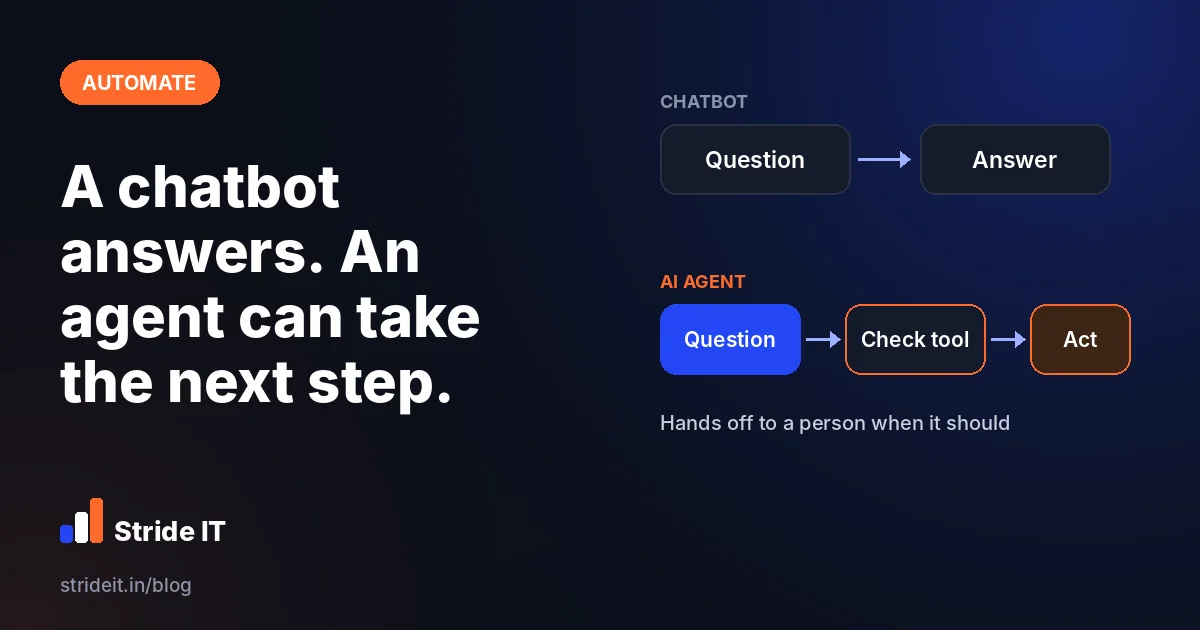
A chatbot answers. An agent can take the next step.
By the Stride IT team
Understand the difference between a helpful answer and an AI workflow connected to your systems.
"We already tried a chatbot." It is a common reply when AI agents come up, and it is usually fair. Many chatbots answer a handful of questions and then say "please contact our team". That is useful, but it is not the same thing as an agent.
The simple difference
A chatbot answers. An AI agent can act, within limits you set. The difference comes from what each one is connected to.
- A chatbot typically works from a fixed script or a set of documents. It can tell a customer your opening hours or return policy.
- An AI agent is connected to your real systems, such as your CRM, orders, bookings or stock. It can look something up, and with the right permissions, update a record, draft a message or pass the case to a person.
An example: "Where is my order?"
A customer asks where their order is.
- A basic chatbot replies with a general line about delivery times and a link to a tracking page.
- An agent connected to your orders looks up that customer's order, sees its status, shares the right information and, if something looks wrong, hands the conversation to a person with the details already attached.
The customer got an answer about their own order, not a generic one. Your team received a case that is already understood.
What changes when an agent is connected to your systems
- It uses live data, not a document that goes out of date.
- It works inside your tools, so staff do not have to copy things between screens.
- It can take the next step, such as drafting a follow-up or logging a note, instead of stopping at a reply.
- It still hands off to a person when the situation needs judgement.
Control matters more than cleverness
Connecting AI to business systems raises fair questions. Good setups answer them clearly:
- The agent only touches the data and actions you choose to connect.
- Sensitive steps need a person's approval before anything is sent or changed.
- Actions are recorded so you can see what happened and why.
That is how Stride IT approaches its AI agents: the agent works inside your dashboards and databases, with approval where you want it. If customers reach you on WhatsApp, the AI service center can answer from your own data on that channel too.
When a chatbot is enough
If your customers mostly ask the same ten questions and the answers rarely change, a simple chatbot may be all you need. An agent makes sense when the useful answer depends on information in your systems, or when the next step is something your team repeats every day.
Questions to ask before you commit
- Which of our systems does it connect to, and what can it do there?
- Where does a person approve or take over?
- What happens when it does not know the answer?
- How do we see what it has done?
Two places agents often start are customer support from your own data and CRM follow-ups.
A second example: the quiet deal
Think of a sales team with a long list of open deals. Some have gone quiet and nobody has noticed. An assistant that only chats cannot help with that. An agent that works inside the CRM can scan the list, spot deals with no activity, draft a short follow-up for each owner and place those drafts in a queue for approval.
The person still decides what gets sent. What changed is that the tedious checking has already been done.
Signs you are ready for an agent
- Your team repeats the same lookup or update many times a day.
- The information needed is already in a system, but people have to dig for it.
- Customers wait because someone has to check something before replying.
- You can describe, step by step, what a good person would do in that situation.
If you can describe the task clearly, it is a good candidate. If you cannot explain it to a new colleague, it needs a clearer process before it needs AI.
Frequently asked questions
What is the difference between a chatbot and an AI agent?
A chatbot answers, usually from a fixed script or a set of documents. An AI agent is connected to your real systems, such as your CRM, orders, bookings or stock. It can look something up and, with the right permissions, update a record, draft a message or pass the case to a person.
Is a simple chatbot ever enough?
Yes. If customers mostly ask the same ten questions and the answers rarely change, a simple chatbot may be all you need. An agent makes sense when the useful answer depends on information in your systems.
How do you keep control of an AI agent?
A good setup lets the agent touch only the data and actions you choose to connect, requires a person's approval for sensitive steps, and records what it did so you can see what happened and why.
What should I ask before committing to an AI agent?
Which of your systems it connects to and what it can do there, where a person approves or takes over, what happens when it does not know the answer, and how you can see what it has done.